Planned releases — track upcoming versions with target dates, status (In Development → Beta → Submitted), and release notes
Mark as Live — promote a planned release to a published release in one step. Previous releases are automatically archived; linked bugs and features are marked Fixed and Done
Release lifecycle — Live, Archived, In Development, Beta, Ready for Review, Submitted
Release notes with Markdown — bold, italic, code, links, bullet lists, and headers render beautifully on the dashboard and release detail views
Export release notes as Markdown or plain text — paste straight into App Store Connect
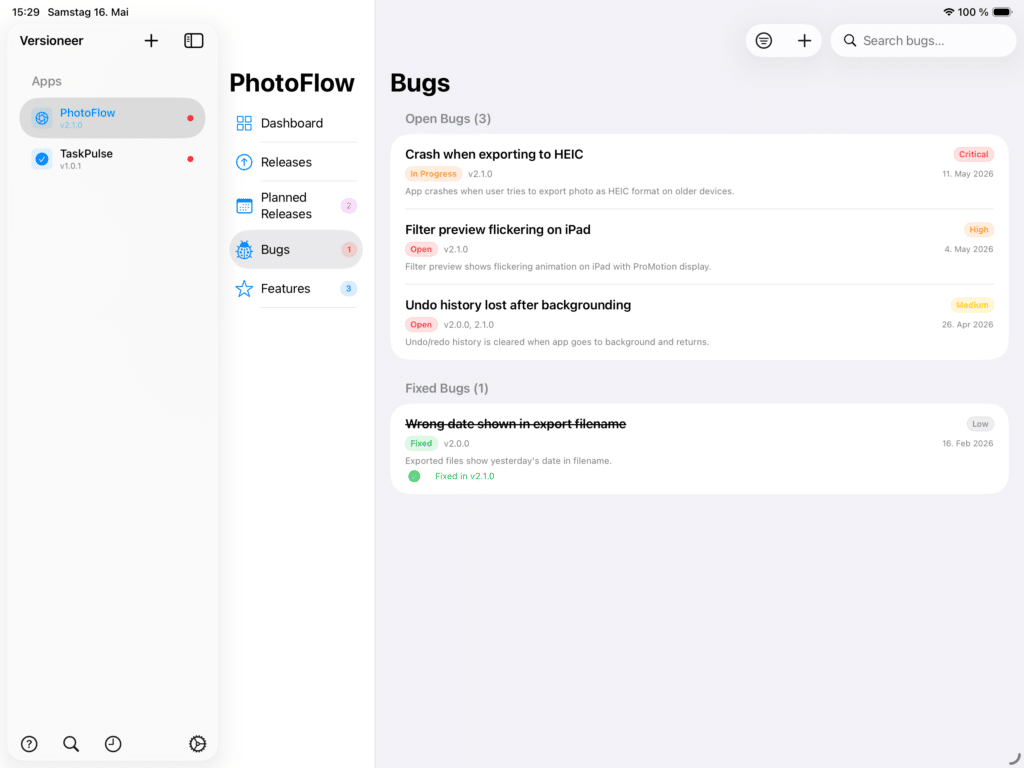
Track bugs
Severity levels — Critical, High, Medium, Low — colour-coded throughout the app
Status tracking — Open, In Progress, Fixed, with discovered and fixed-at dates
Affected and fix versions — know exactly which builds are impacted
Reproduction steps and workarounds — capture the full context of each bug
CSV export — share a bug list with collaborators
Plan features
Priority levels — Must Have, Should Have, Nice to Have
Lifecycle — Idea → Planned → In Development → Done
Effort estimates — Small, Medium, Large
Link to a planned release — see at a glance what’s coming next
See the big picture
Dashboard — open bug count by severity, planned features, next release, latest release notes, all in one screen per app
Timeline view — chronological history of releases, fixed bugs, and shipped features across every app, grouped by month, filterable by event type or app
Global search — find a bug, feature, release, or app across your entire library in a single keystroke
Sidebar indicators — a red dot beside any app with critical bugs, version badge for the current live release
Work fast
Cmd-F search and Shift-Cmd-T timeline — global access from anywhere
Context menus — edit, delete, mark fixed, link to release, export — all one right-click away
Sync and back up
iCloud sync — your data follows you to all of your iPhone and iPad devices, automatically and privately
JSON backup — export everything for a single file, or per-app, anytime; import on a new device or after a fresh install
Local-only fallback — works offline; CloudKit catches up when you’re back online
Privacy and platform
No accounts, no servers, no analytics — your data stays on your devices and your private iCloud
Universal app — designed natively for iPhone and iPad with platform-appropriate layouts
Onboarding — quick three-screen walkthrough with the option to start fresh, load sample data, or jump into the help guide
In-app help — every feature documented, including all keyboard shortcuts